If you need to scroll through rows of data without displaying the entire array at once, virtualization is a good concept to have in your back pocket. A scrollable list of thousands of items could mean thousands of individual DOM nodes, causing the browser to lag instead of looking smooth and polished. Virtualization is rendering a subset of a bigger dataset (which remains in memory/state), while still managing the entire dataset behind the scenes. You display a certain number of visible rows in a height constrained DOM container, and calculate which rows should be displayed by looking at the scrollTop, row height, and the viewport container height.
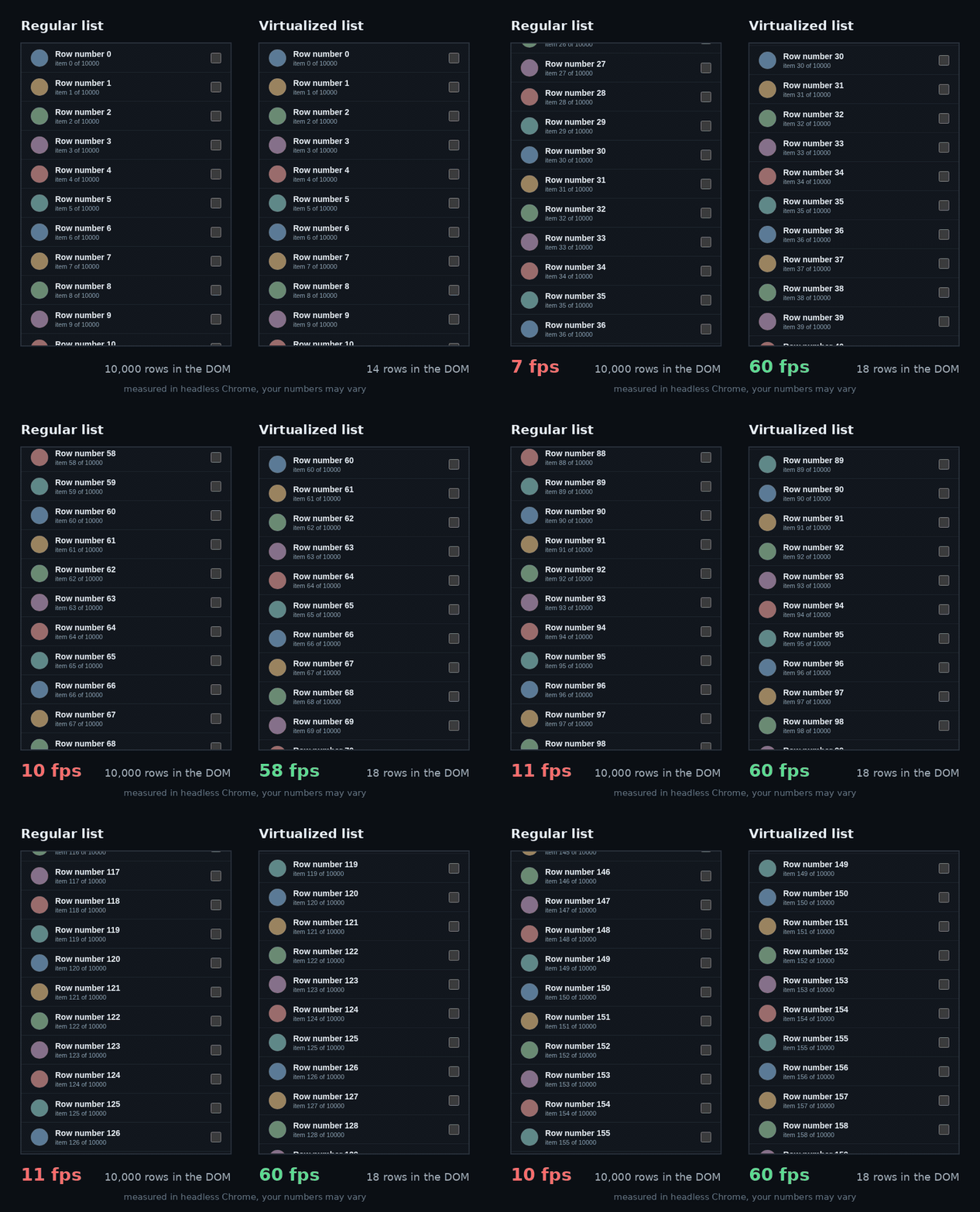
Here's how you implement a virtual list:
You have a certain amount of total rows represented by an array of items, let's say there is 10000 items total in this example and you know each row is going to have a height of 50 pixels, so the totalHeight of all the rows stacked is going to be the ROW_HEIGHT by the number of rows, 10000 * 50, so 500,000 pixels long if every row was visible in this case. Of course this is only because every row in this example is the same height, varying row heights would mean we couldn't simply divide by one number, so it would require a different way of calculating the total height. We want only 10 rows to be visible, so the height of this viewport (VIEWPORT_HEIGHT) would have to be the height of a single row, times the number of rows you want to be visible (10 in our case), 50 * 10 = 500 pixels for the height of the viewport.
We will need a variable to hold which items to display from the larger array, let's call it visible. We can use the slice() method to grab just the subsection out of items that we want. So for example const visible = items.slice(start,end) should contain only the rows we want to render in our container, start and end representing the first index, and the index to stop before (slice range is exclusive) that we want to grab from the larger array. Lastly, we know we will need the amount of pixels to actually offset the rendered rows, offsetY
    const ROW_HEIGHT = 50;
    const VIEWPORT_HEIGHT = 500;

    // generate an array of labeled items
    const TOTAL_ROWS = 10000;
    const items = Array.from({ length: TOTAL_ROWS }, (_, i) => `Row number ${i}`);

    // the height of the whole list, as if every row existed
    const totalHeight = ROW_HEIGHT*TOTAL_ROWS;

    const visible = items.slice(start, end);

    // how far down to push the rendered rows so they line up
    const offsetY = ROW_HEIGHT*start;
Now that we have the starting numbers, how do we actually calculate which rows should be displayed in the viewport as we scroll? (our start and end). Don't forget, with JavaScript onScroll handler we also have access to an element's scrollTop value, the Y pixel position where a user's scroll landed.
// once someone scrolls, we can capture the scrollTop and save it to state
const [scrollTop, setScrollTop] = useState(0);

// Rendering our viewport container with the scrollable list
return(
    <div className="viewport" onScroll={(e) => setScrollTop(e.currentTarget.scrollTop)}>
    ...
    </div>
)
The example that helped it click for me:
Imagine a long ruler showing the entire list of rows, with a mark for every pixel, 500,000 marks in this example, split every 50 (row height) so you can easily see the 10,000 rows all along the ruler. We can put a little window that we can slide up and down the ruler to represent the rows we want to be visible in our viewport.
The top of the window sits at scrollTop, and the bottom edge of this window is at scrollTop + the length of the viewport. All that's left to figure out is which row the top edge of the window sits in, and which row the bottom edge sits in, that's gonna be our start and end index to slice out.
start is the top edge of the window in pixels (scrollTop), divided by row height, rounded down because we need whole numbers for the index, so if we calculate "112.3" here we actually want to show the item at index 112, rounding up here would start the list at index 113, not what we want.
    // the index of the first row to render
    const start = Math.floor(scrollTop/ROW_HEIGHT);
end is the same idea as start, but for the bottom edge of the window (scrollTop + viewport height), divided by row height, and this time rounded up. If that comes out to 112.3, the bottom edge is 30% of the way down row 112, so row 112 is partly visible and has to be drawn. But slice stops before end, so to include index 112, end has to be 113. Rounding down would give 112, which leaves row 112 out and shows a blank strip at the bottom. (If it had come out to exactly 112, the edge sits right at the top of row 112 with none of it showing, so end would correctly stay 112.)
    // the end index (exclusive, like the end of array.slice)
    const end = Math.ceil((VIEWPORT_HEIGHT+scrollTop)/ROW_HEIGHT);
This is why we use Math.floor for the start and Math.ceil for the end. Both ensure that we include any row that is even partially visible.
We now have all the pieces to build our virtual list, but we can improve upon it by adding overscan. Since React doesn't update immediately, if we were to quickly scroll through the list with our current formula that only slices out the exact amount of rows from the total array, you may notice the top and bottom of the list showing a blank space. This discrepancy makes the list update look less smooth than the scrolling actually is.
We can add a variable OVERSCAN to represent the number of rows we want to use as a buffer:
    // a buffer of rows for the bottom and top of the visible list
    const OVERSCAN = 3;
And then update our start and end to use that buffer (I'm splitting out the vars for readability):
      // the index of the first row to render
      const rawStart = Math.floor(scrollTop/ROW_HEIGHT);

      // the start shouldn't be able to go below our first index 0
      const start = Math.max(0, rawStart - OVERSCAN);

      // the end index (exclusive, like the end of array.slice)
      const rawEnd = Math.ceil((VIEWPORT_HEIGHT+scrollTop)/ROW_HEIGHT);

      // the end shouldn't be able to go past the last index
      const end = Math.min(items.length, rawEnd + OVERSCAN);
Back to our DOM, we have a div with CSS class "viewport", adding height: 500px to the CSS style ensures the window stays the height we need, regardless of the total length of the items. Adding overflow-y: auto lets the viewport scroll. Inside that div we put another div with the style <div style={{ height: totalHeight, position: 'relative' }}>. This tall inner div is mostly just empty space, but it's the reason the scrollbar behaves as if all 10,000 rows exist in the container. Finally, we include a div inside of that with our offsetY in a transform style rule <div style={{ transform: translateY(${offsetY}px) }}>. We map over visible, rendering a div for each row that has a height of 50px. Here is what the main div should look like:
<div className="viewport" onScroll={(e) => setScrollTop(e.currentTarget.scrollTop)}>
    <div style={{ height: totalHeight, position: 'relative' }}>
      <div style={{ transform: `translateY(${offsetY}px)` }}>
        {visible.map((text, i) => (
          <div className="row" key={start + i}>{text}</div>
        ))}
      </div>
    </div>
</div>
Let's pull everything together now. Here is a working code example of a virtual list using our example numbers, with a nifty little stats bar below the list to peek into the numbers, all in a simple React component below. Right click here and choose "Save Link As" to save the HTML file, then open it in your browser, or ctrl click the link to open the demo in a new tab. React loads from the internet, so you’ll need a connection.
<!doctype html>
<html>
<head>
  <meta charset="utf-8" />
  <title>Virtual List Demo</title>
  <!-- React 18 + Babel from a CDN so this file runs by double clicking it, no setup needed -->
  <script crossorigin src="https://unpkg.com/react@18.3.1/umd/react.development.js"></script>
  <script crossorigin src="https://unpkg.com/react-dom@18.3.1/umd/react-dom.development.js"></script>
  <script src="https://unpkg.com/@babel/standalone@7.26.4/babel.min.js"></script>
  <style>
    body { font-family: Arial, sans-serif; margin: 24px; }
    .viewport {
        height: 500px;
        width: 360px;
        overflow-y: auto;
        border: 2px solid #1F3B57;
    }
    .row {
        height: 50px;
        box-sizing: border-box;
        border-bottom: 1px solid #ddd;
        padding: 0 12px;
        display: flex;
        align-items: center;
    }
    .stats { margin-top: 12px; font-size: 14px; }
  </style>
</head>
<body>
  <h2>My Tiny Virtual List</h2>
  <div id="root"></div>

  <script type="text/babel">
    const { useState } = React;

    const ROW_HEIGHT = 50;
    const VIEWPORT_HEIGHT = 500;
    const TOTAL_ROWS = 10000;
    // a buffer of rows for the bottom and top of the visible list
    const OVERSCAN = 3;

    // generate an array of labeled items
    const items = Array.from({ length: TOTAL_ROWS }, (_, i) => `Row number ${i}`);

    function VirtualList() {
      const [scrollTop, setScrollTop] = useState(0);

      // the height of the whole list, as if every row existed
      const totalHeight = ROW_HEIGHT*TOTAL_ROWS;

      // the index of the first row to render
      const rawStart = Math.floor(scrollTop/ROW_HEIGHT);
      const start = Math.max(0, rawStart - OVERSCAN);

      // the end index (exclusive, like the end of array.slice)
      const rawEnd = Math.ceil((VIEWPORT_HEIGHT+scrollTop)/ROW_HEIGHT);
      const end = Math.min(items.length, rawEnd + OVERSCAN);

      // how far down to push the rendered rows so they line up
      const offsetY = ROW_HEIGHT*start;

      const visible = items.slice(start, end);

      return (
        <>
          <div className="viewport" onScroll={(e) => setScrollTop(e.currentTarget.scrollTop)}>
            <div style={{ height: totalHeight, position: 'relative' }}>
              <div style={{ transform: `translateY(${offsetY}px)` }}>
                {visible.map((text, i) => (
                  <div className="row" key={start + i}>{text}</div>
                ))}
              </div>
            </div>
          </div>
          <div className="stats">
            scrollTop: {scrollTop} | rendering rows {start} to {end - 1} ({visible.length} rows in the DOM out of {TOTAL_ROWS})
          </div>
        </>
      );
    }

    ReactDOM.createRoot(document.getElementById('root')).render(<VirtualList />);
  </script>
</body>
</html>
Virtualization Libraries
You definitely don't have to build virtual lists by hand every time. Below are two of the most popular options:
react-window is small and simple. Its List and Grid components handle the math we just built, and the row height can be a fixed number, a function that returns a height for each row, or a hook (useDynamicRowHeight) that measures rows as they render. It's a good place to start if you want a lightweight virtual list out the box.
TanStack Virtual is headless, meaning it hands you the numbers (which items to render and where to place them) and you write the markup and styling yourself. It's more flexible, but takes a little more setup. It has adapters for React, Vue, Svelte, Solid, Lit, and Angular. It's robust, supporting vertical, horizontal, and grid layouts, and it can measure rows of different heights after they render (using measureElement).
When NOT To Use DOM Virtualization
- Browser search (Ctrl+F) can't find rows that aren't rendered. Only the visible rows exist in the DOM, so find in page can't see the rest. If users need to search the whole list, give them a search box or filter, or use pagination.
- Deep links are more annoying. If someone needs a link straight to the start of the 4th "page," pagination can put that in the URL as a query parameter (
?page=4) and the state is simple to manage. You can scroll to an index based on the URL with virtualization too, but it will be more work. - Variable row heights remove the simplicity of our formulas. The math depends on knowing how tall things are. When the heights of rows are unknown, libraries have to estimate first, measure after the rows render, then adjust. Estimating incorrectly can make the scrollbar and/or scroll position jump, so fixed heights are the easy case for virtual lists.
- Accessibility and keyboard navigation will need extra care. Screen readers and the tab key can only reach the rows that exist in the DOM, and rows come and go as you scroll with a virtual list. You will have to ensure whatever library you choose handles this properly.
- Select all and print only include what's actually rendered.
- If you have a small list to render you probably don't need it. If you only have a few hundred simple rows, the browser will scroll them smoothly, and virtualization is just overkill at that point. It's important to actually test your code for performance instead of optimizing for the sake of it.
Whether you decide to build a custom virtualization solution from scratch or opt for an established library, you now have the tools to ensure scrolling through a gajillion items doesn't blow up the browser. Feel free to ask questions or leave feedback on GitHub, X, or Instagram, or see more of my work at jeane.dev. 🌸